Saturday, 18 February 2023

Sello de la abadia del crimen

 Aunque en principio esto no sea muy antiguo, es del año 2017 ,  el juego al que se homenajea si que es antiguo y esta considerado el mejor (o uno de los mejores juegos españoles d etodos los tiempo. Por eso aprovechando que me lo han pedido escaneado, pues lo dejo por aqui.

Ya hay en Internet bastante información sobre el juego desde la wikipedia hasta remakes modernos del juego como en http://www.abadiadelcrimen.com/ e incluso una versiòn extendida en https://www.abadiadelcrimenextensum.com/el-juego/


El sello ademas es curioso, si se aplica calor en las puertas aparece un icono de uno de los objetos que había que buscar durante el juego.


Monday, 2 May 2022

Juego de Tenis , fronton y ....


Esta entrada es un poco más larga , han sido algunas horas rebuscando información por Internet sobre un curioso juego de tenis que hizo mi hermana en base a un Kit de electrónica, antes de la llegada del ordenador personal.

A principios de los años 80 existían los llamados Kits de Electrónica , donde con un paciencia, un soldador y el Kit correspondiente se podían construir bastantes montajes electrónicos.  Uno de los montajes que hizo mi hermana fue un juego para la TV , que permitía a dos jugadores jugar a los juegos de Tenis, fronton y futbol. 

En la siguiente captura se puede ver los mandos del equipamiento y el juego de futbo con dos jugadores en una televisión de tubo, los mandos como no eran analógicos y el juego aunque antiguo todavía es bastante jugable.

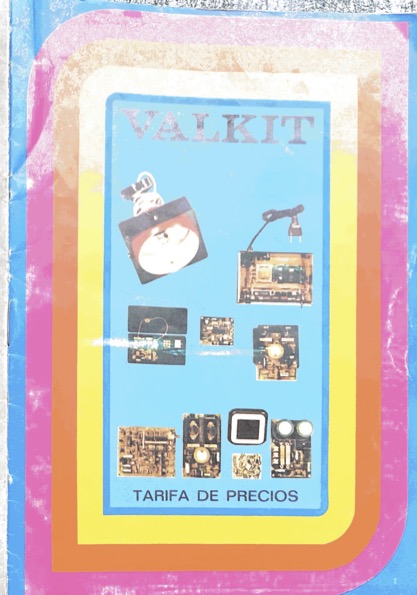
Investigando un poco , y rebuscando entre los papeles perdidos encontré un catálogo  de la marca VaKit en el que aparece indicado como número 108 este juego, por desgracia no encontré la caja con la instrucciones de montaje.


Sin embargo  me puse a rebuscar de nuevo en las enciclopedias de electrónica , que también tenían mucho éxito por esta época y en la enciclopedia práctica de electrónica en su número 22 (que costaba 100 pesetas del año 1982), aparece un montaje muy similar.


Que después de examinar es efectivamente la descripción del montaje del Kit-108 de Valkit  con toda la información.

Con una mentalidad "clásica" del informática == ordenador , me pongo y a buscar en la descripción de los componentes, etc, a ver si puedo averiguar el tipo de memoria, procesador, etc y resulta que en todo el montaje solo hay 3 "circuitos impresos" , (IC1 a IC3), y examinado la descripción y buscando por internet como no aparece que el Chip MM57105N  de National Semiconductor, puesto a la venta en 1976 , es el chip en que esta este "pong en un chip". En esta página se describe como en los años 70 hubo varias compañías que desarrollaron este tipo de juegos en un chip,  rebuscando un poco más el MM57105N es la versión PAL (europa) del MM57100N (NTSC) del cual todavía se puede encontrar el datasheet  con información del chip.

Esta visto que los SystemOnChip, SoC, no son invento reciente  ;-)

Postdata: Como desilusión resulta que los juegos no eran tenis, fronton y futbol, sino tenis, fronton y hocket, esta visto que nos creíamos cualquier cosa.


Saturday, 17 April 2021

Lo que duran las baterias ...

 Un equipo que llevaba más de 10 años sin estar conectado a la red electríca, arrancado sin conectividad ninguna (salvo el puerto serie el Miercoles 17 de Abril de 2021 y sin embargo

:

Switch Control Processor P5 - 64  Jun 20 2000

Boot Prom Version 4.0

Copyright 2000, Marconi plc.

64MB SDRAM detected


                            VxWorks System Boot


Copyright 1984-1996  Wind River Systems, Inc.


CPU: FORE Systems SCP-P5-266

Version: 5.3.1

BSP version: 1.0/0

Creation date: Jun 26 2000, 14:01:20


Press any key to stop auto-boot...

 0

auto-booting...


boot device          : fs

processor number     : 0

host name            : host

file name            : /CURRENT/FOREOS.EXE

flags (f)            : 0x0


Loading fs:/FT7.0/foreos.exe.

Decompressing fs:/FT7.0/foreos.exe ...............done.

Starting at 0x108000...


Attaching network interface lo0... done.


Adding 4232 symbols for standalone.


ForeThought Switch Control Software

Copyright (C) 1992-2000  FORE Systems, Inc.

All rights reserved.


Attaching network interface ie0... done.

APR 17 12:11:54 tAsx[X]:   debug: Getting NVRAM

APR 17 12:11:54 tAsx[X]:   debug: Got the NVRAM correctly

APR 17 12:11:54 tAsx[X]:  NOTICE: Platform (ASX-200BX)

APR 17 12:11:54 tAsx[X]:  NOTICE: SAT APR 17 10:11:51 2021


APR 17 12:11:54 tAsx[X]:    INFO: Trying to restore fs:/hidden/cdb.dat file......

APR 17 12:11:54 tAsx[X]:    INFO: Setting Switch Timezone to MET-1MET,M3.5.0/02:00,M10.5.0/03:00

APR 17 12:11:54 tAsx[X]:  NOTICE: SCP X present


APR 17 12:11:54 tAsx[X]:  NOTICE: SCP Y missing


¡¡ El reloj interno mantiene la hora !!! 


Tuesday, 19 December 2017

Cisco AGS+


Uno de los primeros routers que se pusieron en RedIRIS ,  y que estuvo funcionando (al menos tiene la versión de IOS 11.0 ) hasta 1997, fueron estos equipos, introducidos por Cisco a principios de los años 1990, (habrá que investigar en el boletín si aparece más información.


El equipo disponía de varios slots para puertos serie y dos Ethernet a 10mbs con interface AUI para la conexión en local.


Curioso que ya en esa época el equipo disponía de ventilación lateral,  e incluso de "interruptor de encendido":


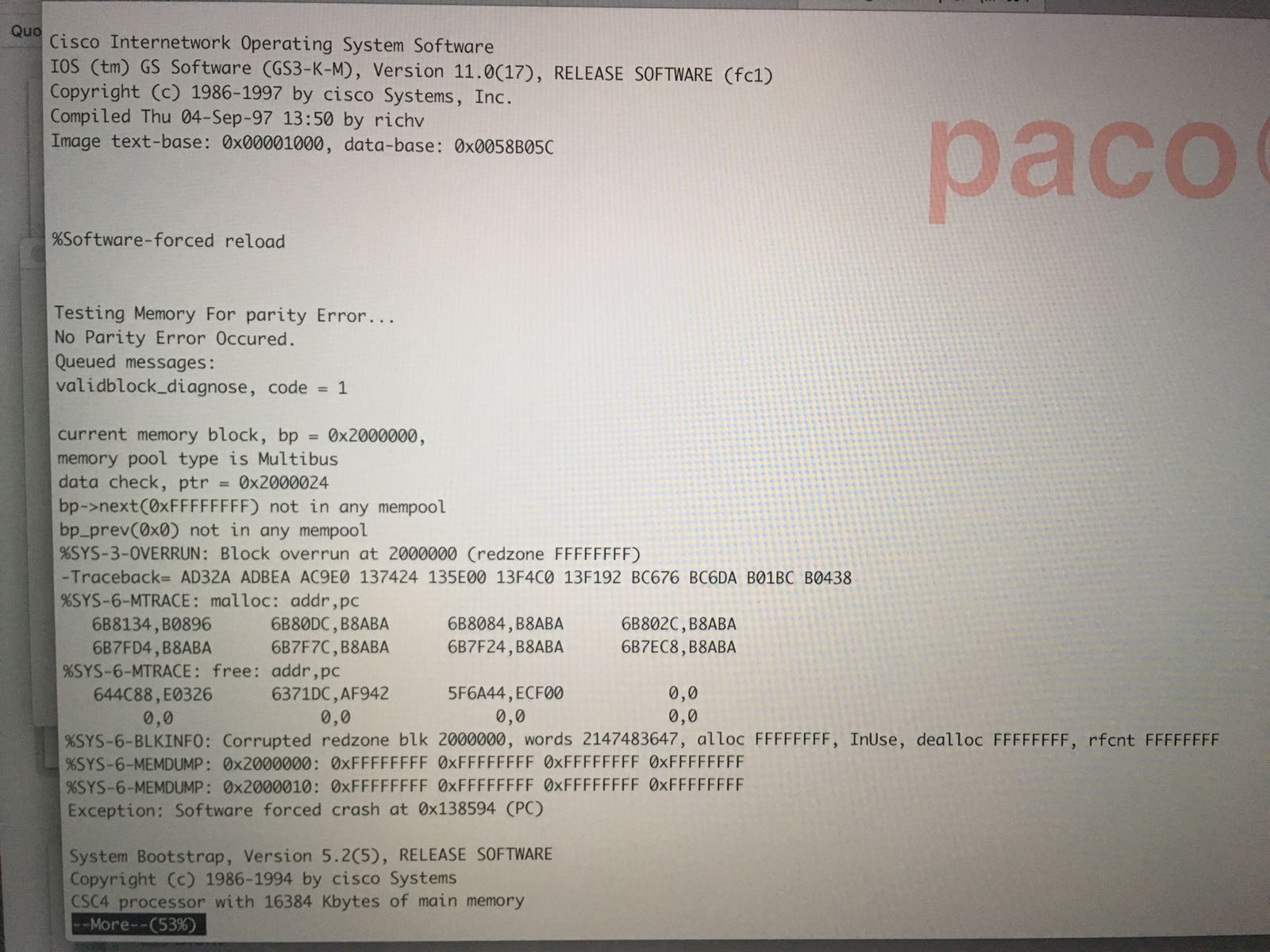
Por desgracia parece que la obsolescencia programada no es un asunto reciente, ya que aunque la memoria "flash" parece que funciona correctamente y el sistema arranca,  se produce un error al empezar a ejecutar el sistema operativo, lastima no se va a poder conectar a internet de nuevo..


Friday, 27 April 2012

imac G4 - 2002


This model is from 2002 and has the honor of have been exposed in the New York MOMA museum , it was the first imac with LCD display, and was nicknamed "ilamp", as it's shape remembers sometime of a desk lamp , and a video made by pixar.


The design was quite impresive, including the transparent speakers and the boxing of the computers was also great , with space for the mouse, keyboard and all.


This last picture show the imap inside it's box, with the speakers also in their space .

Sunday, 4 March 2012

Apple II & Unitron Clone


The computer that launches Apple to the fame was the famous now  apple II,  I'm not going to start here talking about this computer or company , mostly because there are a lot places in internet where you can find information about the model.

Those computers wheren't so frequents in the South of Spain because there were too expensive compared with the Sinclair/Amstrad and similar computers that most of the young people started in computers.

I was lucky to receive two computes when I started to collect old computers, full with floppy drive unit, extension cards (including a serial card and modem) and a lot of programs, I will try to boot again both computers soon, but first I need to find a old TV to connect the machines.

Both computers seems to work, at least the keyboard light works when both computers powers on , but I still need to test them again.

One of the curious thing is that one of the computers is not named "Apple", but it is branded "unitron",  but as you can see from the pictures both of them are equal, and in fact the floppy drives, extension card and so on are compatible.

Looking at http://www.museo8bits.com/unitronap.htm it seems that the unitron where clones made in Brazil, so it's interesting how the computers come to Spain.


Monday, 13 December 2010

Macintosh Portable

In the last year of the 8x, Apple had a good customer base, and they have successfully moved from the Apple II series to the original Mac, so it  was time to  think in the executive people that were moving from some place to other, so they launched their first "Portable" computer.


This "ancestor" of the Ipad weight about 7Kg, so it was not  usual to see people using it in the airports to read their  emails ;-) (FaceBook was not invented so people don't use this computer to updade their profile ;-)


Internally this Mac has a lead-acid battery , that unfortunately in this model is not woking...


But we are looking for a replacement, it would be nice to see which documents and presentations has this Mac inside ;-)

Monday, 12 April 2010

Sun Ultra 5

It was November 2003 and I was in Tokio after a conference, so what is one of the geek places to visit in Tokio ?, ...
(if you don't know the anwser it should be that you have not been in Tokio and not a computer collector ;-).

Akihabara, is an area of Tokio full of electronic equipment, new and also used /old, so it was the perfect place to buy some olf stuff. After visiting the place I bought a Sun Ultra sparc5 for 6,300 Yens , about 50 Euros in 2003, so it was a cheap.

 The problem is, "how to carry a Sun ultra Sparc 5 home ?", (and cheap / free ) , the machine weight about 8kg, so it was not good to put inside the baggage.

The reply is easy , as "cabin baggage", so here are two pictures of the machine prepared to flight home:


Both pictures were taken in the Hotel room just before leaving, it was quite heavy, but fortunately I don't need to walk too much to reach the airport.

 About the machine it wood to remember that was one of the "cheap Sun", (with IDE hard disk & cdrom,  VGA video output and so on,) but with a Ultra Sparc chip , able to run the recent Solaris 10
(if you have enought RAM).

 I will try to put more pictures of this machine at home soon.

Friday, 8 May 2009

16Kb memory expansion for ZX81


The original sinclair ZX81 has only a 1kb memory of RAM, so it was quite difficult , but not impossible , to produce any big program, obviously soon there was memory expansion for them and one of those modules was the 16Kb memory extension (usually any image of this blog , compressed and so on it's too big to fit in those memory modules, but in a few years ago 16 kytes of RAM where a lot of space .


As a curiosity , the three first models of sinclair used the same processor, the zilog z80, so where able to access up to 64Kb of RAM (2^16) , so with the different size in their ROM size (BASIC interpreter, Input/Output routines, etc), produces that the total RAM size of the machines where bigger in the first models (up to 60Kb in the sinclair ZX80, 56 kb in the sinclair ZX81 and only 48Kb in the last model sinclair Spectrum.

After the sinclair spectrum the other models (sinclair spectrum 128, +2, and +3 ) used a technique named "pagination" to share a memory space between different memory banks allowing to have more than 64kb, but not at the same time.


casio FX-702P

Another calculator from casio, with a BASIC interpreter allowing to develop your own programs, this model has the unusual feature of not using a QWERTY keyboard, and keys are aligned following their alphabetic order in a 7x4 rows


Sinclair ZX-interface 2


Sinclair made some interfaces to enhance the posibilites of the most successful product, the Sinclair Spectrum , those interfaces include the interface 1 (allow to connect to microdrive units and serial RS-232 interface ) , the ZX-printer interface (thermal printer and this interface, named "interface 2".

This interface allow to connect two joystick to the spectrum , using the "Sinclair type joystick", that usually links the numeric keys to the joystick and the other facility provided by this interface was the use of memory cards with games and utilities that allow to start running applications and programs without loading them from tape.


Unfortunately the cartridges were quite expensive so few games were produced in this format, also it was ROM (read only memory) so people can't save their own games in them.


Tuesday, 27 January 2009

Quantum Lap , Sinclair QL


In 1984 sinclair launched the QL, Quantum Lap, as a computer aimed to a more professional sector, it has some revolutionary aspects (it was based in the 68008 Processor, a 32 bit processor with a 8 bit interface, ( 8 bit connectors and hardware was cheaper and price was always one of the basic features of Sinclair machines).


The system has a revolutionary "multi tasking BASIC interpreter", 128 Kb of RAM and instead of using the expensive floppy drives (remember 1984 , 5' 1/4 floppy were still common in 1990, or the slow and sequential tape system (like the spectrum ), uses their own technology , the "microdrive"

Microdrives were in fact small tapes that were inserted in the unit and must be formatted to be ready, to use, allowing to store about 85kb of data.

As the tape runs quite fast, the tape must be formatted in sectors , so it can be used as a random
device (instead of the typical sequential tapes).

Here is the a view o the unit, the QL came with two units

As this machine was targeted to the profesional market it come with a full "Office Software", in four
microdrives and other blank microdrives.


The package was "Quill" (the word processor), Abacus (spreadsheet ) , Archive (Data Base) and Easel (Graphs) that provides most of the usual needs for an normal user.


The machine provides two serial interfaces and was able to connect to other QL machines using their own network protocol (similar to token ring), and be connected to a normal TV or a computer monitor, also has serial interfaces ,


The three first sinclair


The first years of the 1980 decade was dominated in Europe by sinclair, the company launch a new model of computer every year, changing from the "white" ZX80 , with 1 Kb of RAM, then the ZX81, with provided a better BASIC support , but still only a 1K of RAM , and the next year the Spectrum with
Color !! , and 16Kb of RAM (or 48K in the upper model) .


Sinclair Spectum 48K aka gomas

This is the FIRST model of computer that I got, as I told before I "upgraded" the sinclair 48k to Sinclair + (the one two or three post before).

This machine is a gift from a college  after he discovered my not so hidden Computer Diogene Syndrome (recollect all kind of old computers ;-)

About this machine there is few more things to say perhaps that the best Spanish Company started developing games for this platform (Dinamic ) and that more than a generation of Computer Engineers and technical people in Spain grew and learn to play games (and sometimes also some BASIC language ) with it.
The machine was too popular that some radio station used to broadcasts games that the user save in a normal tape , loading the games from the tape.
here you can see, from left to right the power connector, expansion slot and the plug for saving and loading files from a normal tape.

Monday, 12 January 2009

Philips P3105

This was the third computer that I got , after the beloved Sinclair Spectrum and a CASIO FX-750 calculator with a BASIC interpreter. It was bought in Summer of 1989 , and it was a big jump , compared with the old spectrum , not only in size, but also in the use of disk and the hard disk
(20 Mbytes).

The CPU was an intel 8088 , that can run at the "normal" (4.x Mz) and "fast" (8.xMz,) speed , and has a program to change the the speed internally , the 3.5 drive (720 Kb) where added the same
year, and it was an "high density" drive, but the floppy controller only support the double density
(720kb).

The monitor was monocrome (orange one), with a mixed CGA/Hercules card and an amazing memory of 768 Kb, (640Kb of normal RAM used by MS-DOS and another 128Kb that only with MS-DOS 5.0 and the special software "Qemm" where possible to use for driver.

The Operating System was old MS-DOS 3.30 ,and also in the following years I upgraded the machine to other Operating Systems up to MS-DOS 6.2 , installed the "stacker driver", (to duplicate the hard disk space), and played a lot with it.

I remember also to play with the minix 1.x operating systems (booting from the 360Kb disk drive) and also booting the MS DOS 1.1 , that don't provide the "subdirectory feature (it was mostly a clone of the CPM operating system, other software that runs in this machine was the microsoft windows (from 1.x to 3.11), the GEM Desktop (digital research clone of MacOS graphical environment) and so on.


Sinclair Spectrum 48k

This was the first computer that I got, in 1984, the current keyboard is newer , as it was purchased as a normal sinclair and late converter to the "plus" one (the only difference was the keyboard).


The machine has a zilog z80 microprocessor and has 16kb of ROM and a RAM memory of 48Ks, including 6912 bytes for the graphics display and other system variables so only about 40,5 kb where employed normally for games and software.

The programs where loaded from a tape (I still have too much tapes full of programs ;-), and it was possible to program in BASIC and machine code, the graphic resolution was not great , but some of the programs are still amazing .

In order to save RAM space the BASIC interpreter assingned one of the ASCII code to each of the language keyworks, so for example the "print" command employs only a a byte of memory. A complicated combinations of keystrokes allow to produce all the symbols, one of the various emulator was named "JPP" , due to the fact the "J" key directly puts the "load" command and the double quotes wre in the "P" key so JPP was roughtly load "" , the order to load any program form the tape.

In this picture you can see the power plug for the external power adaptor , the expansion slot and the tape plugs for connecting the machine to and external tape. Later sinclair models (+2) have the
tape incorporated to the machine.

I'll try to find all the hardware (for example a game save device, parallel port, etc) that I 'd for this machines

The most usual problem with this macine was the keyboard, under the plastic cover in the Spectrum 16k and 48k, there were this plastic membrane that was easily broken when you tried to play games, and the only solution was to replace it.

Wednesday, 8 October 2008

Sinclair PC200

This was the last machine produced by Sinclair after the company was bought by Amstrad , and in fact the "sinclair name" is only a commercial brand as it seems that the model is not derived from the work of Sinclair Research, but directly from Amstrad.

This is also the only "PC" clonic from sinclair, and it was intruduced in the late 80's, when the amstrad.

The computer is similar to the Olivetty PC1, and other PC clonic in the sense that has the keyboard and CPU integrated in the same chasis, it has a 8086 compatible micro and a 720Kb 3 1/2 disk drive.


As curiosity the computer has output for a CGA monitor and also a TV monitor, in this other picture you can see the TV , CGA , Serial and parallel connectors, and also the
expansion bay.


After some problems (it's very difficult to find a CGA monitor to test the computer) , I realized that I have some "TV" connectors from other very old computers like the sinclair spectrum so I tested and ....


Keyboard is not working ;-(, it seems that the computer has some keyboard problem, it's a pity as it seems that only 20.000 units of this computer were sold, so it is very difficult to find a working one.

Monday, 5 May 2008

Macintosh SE 1/20

This was one of the first apple machine that I saw when I was at the University, this little "portable" machine was used mainly for the University staff (students only got access to normal 8086 Olivetti computers and some i386-sx machines, and when they discarded the machine I could manage to get it.


The handle on the top allow to carry the machine from some place to another very easily and as you can see it has the normal SCSI and sound connectors.

The machine still boots , with a old operating system (I don't think it can be upgraded to any other version ). the CPU is the old 68000 , without the 32bits extensions and so on, so obviously no "MacOS X" inside.


Amazingly Microsoft word 5.0 from 1992 can run on in and the visual aspect is more or less similar to the modern Microsoft programs, so perhaps "Word processors" are the most stable software in modern computers.

Wednesday, 2 April 2008

Tandy TRS-80 Color Computer

Another Relic that cames directly from an Ebay auction (now with the "strong Euro" somethings are quite cheap to buy), this machine was produced in the Early 80 (from 1980 to 1983 by Radio Shark) and has a BASIC interpreter (like most of the home computers at this time), the processor was a Motorola MC6809E and was sold with 4Kb of RAM.


The machine cames with a colored basic manual as it was usual in the early 80 :

With nice illustration showing the fundamentals of BASIC programming, trying to attract young people to the language, and avoiding the "serious and technical documentation" of
the first PC sold.


The computer has connectors for TV, Tape Joystick and serial (for using a modem) or printer, and unfortunately a US connector for 120V electric power, I need to buy a 120V to 220V transformer to test it.


There is a lot of more information in the Wikipedia Page of TSR-80 Color computer that show more information about this machine.

Monday, 17 March 2008

Router Vine200

another machine that was literally going to the trash, I found it in a debris container in the street, a homeless was scavenging copper cables when I saw the four RJ-11 connectors, so I got
it, unfortunately without the power adapter that it seems that have a non-standard connector.

The router was covered with white stucco and after carefully removed most of them (still some in the photos) , I found the name of the vendor.


It seems that this router was used mainly by Jazztel an Spanish ISP, when installing xdsl connection in the professional lines, the ISP don't give the configuration password to the users, but as usual the credentials are easily found in Internet.

The four RJ11 connectors don't provide VoIP connections (at least no real VoIP), only allow to connect normal phones to the line.